


Which platform offers AI-driven video storyboard creation?
Several modern video platforms now offer AI-driven storyboard creation, including Biteable, InVideo, and Pictory. These tools use artificial intelligence to turn a script, prompt, or URL into a structured, scene-by-scene video outline. The right choice depends on whether you are creating marketing content, training materials, social media videos, or avatar-led presentations.
AI storyboarding tools reduce the time required to plan video structure while still allowing manual editing and refinement.
What Is AI-Driven Video Storyboard Creation?
A storyboard is a visual outline of a video. Traditionally, storyboards are created manually by mapping out scenes, visuals, text overlays, and narration before production begins.
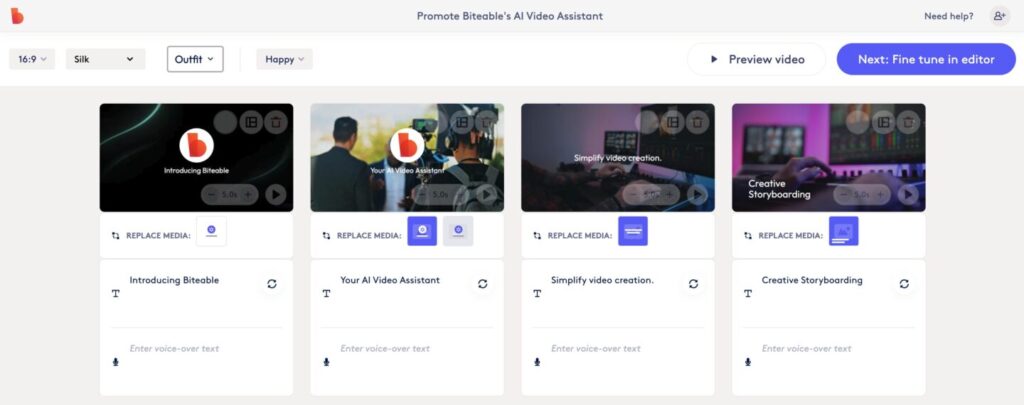
AI-driven storyboard creation automates this process. Instead of manually planning each scene, users provide input such as:
- A short prompt
- A full script
- A blog post URL
- Product copy
- A marketing brief
The platform then generates:
- A scene-by-scene breakdown
- Suggested visuals or stock footage
- Text overlays and titles
- Transitions
- Voiceover suggestions
The output is typically editable, allowing users to adjust timing, visuals, messaging, and branding.
How AI Storyboarding Works
AI storyboard systems rely on natural language processing and generative models to interpret intent and structure content logically.
Step 1: Script or Prompt Analysis
The system analyzes the input to identify key themes, sections, and transitions.
Step 2: Scene Segmentation
The content is divided into digestible scenes, often aligned with narrative beats or logical topic shifts.
Step 3: Visual Mapping
The platform suggests stock footage, animations, layouts, or avatars that align with each scene.
Step 4: Timeline Assembly
The storyboard becomes a fully editable draft within the video editor.
Some tools focus on generating a rough script. Others go further and produce a complete visual timeline ready for editing.
Platforms That Offer AI-Driven Storyboard Creation
Below are widely used platforms that support AI-assisted storyboard generation.
Biteable
Offers AI tools that convert prompts or scripts into structured scenes within a timeline-based editor. Includes branding controls, stock assets, and optional AI voiceover features.
InVideo
Supports script-to-video generation with scene auto-creation and stock footage matching.
Pictory
Focused on turning long-form content, such as blog posts or webinars, into segmented video drafts.
Comparison of AI Video Storyboard Tools
| Platform | Text-to-Storyboard | URL-to-Video | Scene Auto-Generation | AI Voiceover | Branding Controls |
|---|---|---|---|---|---|
| Biteable | Yes | Yes | Yes | Yes | Strong |
| InVideo | Yes | Yes | Yes | Yes | Moderate |
| Pictory | Yes | Yes | Yes | Yes | Moderate |
Capabilities of different platforms that offer AI video storyboards evolve quickly, so reviewing current feature documentation before selecting a platform is recommended.
When AI Storyboarding Is Most Useful
Marketing Teams
AI storyboarding helps teams quickly transform campaign briefs into draft video concepts. It supports rapid iteration, A/B testing of messaging, and short-form content creation for social platforms and promo videos.
Learning and Development
Training outlines can be converted into structured modules, saving instructional designers on Learning and Development teams time during the planning stage.
Small Business Owners
AI tools remove the need for manual scene planning, allowing founders or operators to produce promotional videos without a creative department.
Agencies and Consultants
Storyboards can be generated quickly for client review, reducing manual layout work and accelerating approval cycles.
What to Look For in an AI Storyboard Platform
Choosing an AI storyboard platform requires more than checking whether it can generate scenes from text. The quality of the underlying structure, the level of editing control, and the ability to align output with your brand standards all matter.
Scene logic and flow
One of the most important factors is scene logic and narrative flow. The AI should break your input into scenes that feel intentional rather than arbitrary. Transitions should reflect shifts in topic or emphasis, not just sentence breaks. If the generated storyboard reads like a coherent outline before you even edit it, that is a strong indicator the system understands structure rather than simply rearranging text.
Editing flexibility
Editing flexibility is equally important. AI-generated drafts should be fully editable within a timeline-based interface. You should be able to reorder scenes, swap visuals, adjust pacing, rewrite text overlays, and modify voiceover timing without friction. Platforms that lock you into rigid templates can limit creative control and reduce the practical value of automation.
Branding
Brand control is another critical consideration. The ability to apply consistent fonts, colors, logos, and layout styles ensures that AI-generated drafts still feel like your company’s content. If brand kits or saved styles can be applied automatically to generated storyboards, production becomes significantly more efficient for teams creating content at scale.
Asset library
Asset library depth directly impacts the visual quality of your storyboard. A large, well-organized stock library with relevant footage, animations, and design elements allows the AI to match scenes more accurately to your message. Weak or limited asset libraries often lead to repetitive or generic visuals that require manual replacement.
Voiceover and captions
Voiceover and caption integration can meaningfully reduce production time. Platforms that generate synchronized AI voiceovers and auto-captions as part of the storyboard workflow eliminate separate steps later in the process. This is especially valuable for marketing teams producing short-form content or L&D teams building structured training modules.
Export options
Export capabilities should also align with your distribution strategy. Support for multiple aspect ratios, platform-specific formats, and higher resolutions such as HD or 4K ensures your storyboard can move smoothly from draft to published content. If you create content across social, web, and internal channels, flexible export settings become essential.
Collaboration
Finally, collaboration features become important as soon as more than one person is involved. Shared workspaces, commenting, and version history help teams review and refine AI-generated drafts without duplicating effort. In agency or client-facing scenarios, the ability to share storyboard previews before final export can streamline approvals and reduce back-and-forth revisions.
An effective AI storyboard platform should accelerate structure without reducing control. The strongest tools generate a logical first draft while preserving the flexibility needed to refine narrative, visuals, and brand voice.
Frequently Asked Questions
It is the use of artificial intelligence to automatically generate a scene-by-scene outline for a video based on text input, scripts, or URLs.
The system analyzes the script, segments it into logical sections, assigns visuals to each section, and builds a draft timeline within a video editor.
The best platform depends on your goals. Marketing teams may prioritize branding and editing flexibility, while training teams may prioritize structured narration and clarity.
AI is faster and helpful for first drafts. Manual refinement is still important for high-quality storytelling.
Some platforms support URL-to-video workflows that extract text, summarize it, and generate scenes automatically.
Most modern tools allow editing of scenes, visuals, text, and timing after generation.

